
Engineering · 9 min read
I turned an old Android phone into a Linux server (and it has a dashboard)
Alpine Linux running natively on a Samsung Galaxy A12. No Android underneath, no Termux, no chroot. Just Linux, Podman, and a phone that has no idea what happened to it.
You're reading this on the phone
This blog is served by the same Galaxy A12 this post is about. It's a small FastAPI app in a Podman container behind Caddy. Every time I push to GitHub, a webhook tells the phone to build the new version, start it next to the old one, and switch over once it's healthy (a blue/green deploy). If this page loaded, the phone is still alive.
The pitch#
Everyone has an old phone in a drawer. It has 4 GB of RAM, eight cores, a battery that is a built-in UPS, Wi-Fi, and a screen. Compare that to the cheapest cloud VPS, which has none of those except RAM.
So I asked a dumb question: can I delete Android and run a real Linux server on it?
Yes. It took me about a week, one USB cable, and a lot of staring at a Samsung logo that kept restarting. This post is the shortened version, so you can skip the staring.
Read this first
- This is for the Samsung Galaxy A12 (SM-A125F, MediaTek MT6765). Other phones will differ in annoying ways.
- Unlocking the bootloader wipes the phone, and flashing the wrong thing can brick it. I am not responsible for your phone. Your phone is also not responsible for me.
- It is a hobby server on an old kernel. It is not production. Do not put your bank on it.
What you end up with#
- Alpine Linux 3.24 on the stock Samsung 4.19 kernel, installed on the phone's own storage (about 110 GB ext4).
- Wi-Fi, SSH, a firewall, and Podman containers (Postgres, Caddy, a backend, whatever you like).
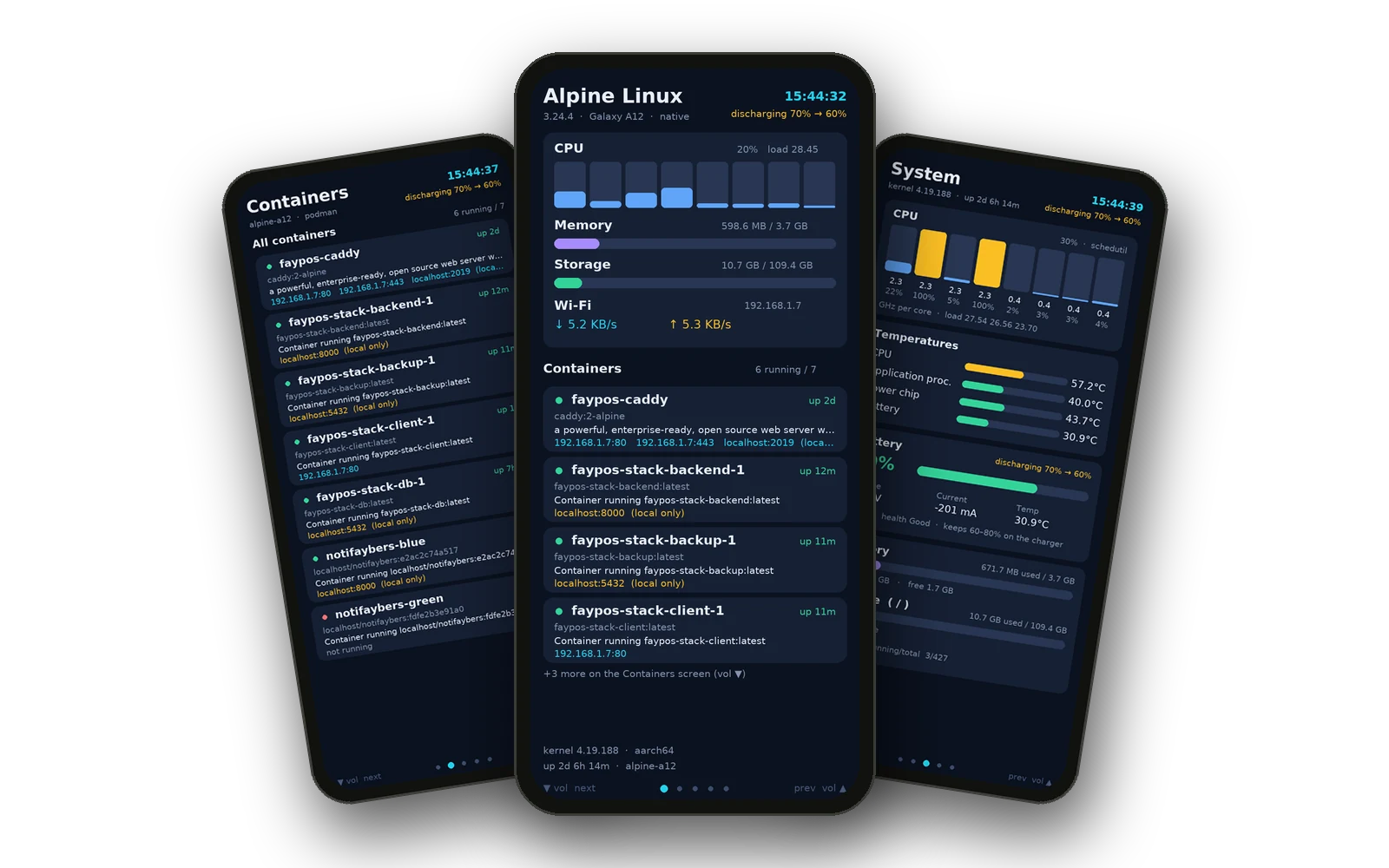
- A live dashboard drawn straight onto the phone screen, with five pages you switch with the volume keys.
- A battery guard that stops charging at 80%, resumes at 60%, and backs off when the battery gets hot.
Running idle it uses about 400 MB of RAM, which leaves room for your actual work.
The plan, in five acts#
- Unlock the bootloader.
- Get the exact stock firmware, because you will need it later.
- Build a boot image that starts Alpine instead of Android.
- Flash it with Odin (the Linux way, with a small patch).
- Make Wi-Fi work. This is the boss fight.
Act 1: Unlock the bootloader#
Settings → About phone → tap Build number seven times like a person trying to summon something. Then Developer options → OEM unlocking. Reboot to Download mode, long-press Volume Up at the warning screen, and confirm.
Warning
The phone will factory reset. Back up anything you care about, because it will not ask twice.
Act 2: Keep the stock firmware#
Download the exact firmware for your model and region (I used A125FXXS4CWK3, region PAK). Unpack it and keep boot.img, vbmeta.img and userdata.img somewhere safe.
This is your undo button. If something goes wrong, you flash these back and Android returns, slightly offended but alive.
Act 3: Build the boot image (where I lost two days)#
You do not need to build a kernel. The Samsung kernel already boots, and it already has USB gadget support. You just give it a different ramdisk.
The ramdisk is a tiny Alpine/busybox init that does three things:
- Paints the screen white, so you can tell it is alive.
- Starts a USB gadget (serial + RNDIS network), so you always have a way in.
- Mounts the real Alpine root from the
userdatapartition andswitch_roots into it.
Sounds easy. Here is what actually happened.
Every modified boot image went into a boot loop. Samsung logo, black screen, repeat. I tried a custom init, a do-nothing init, a tiny initramfs, new AVB footers, disabled vbmeta, and even a userdata wipe. Even changing one byte in Samsung's own ramdisk looped.
The fix was not the contents. It was the layout. The bootloader wants the image built exactly like Magisk builds it:
[ mkbootimg output ]
[ the stock 528-byte SEANDROIDENFORCE trailer ]
[ padding to 4096 ]
[ the stock signed vbmeta blob (2112 bytes) copied from the stock boot footer ]
[ padding ]
[ AVB footer with the new original size and vbmeta offset ]
Total size 32 MiB. Then flash only the boot partition and leave the vbmeta partition stock. Own signatures, unsigned footers and disabled vbmeta all looped. The stock signed blob copied in worked.
Test your builder first
I wrote a script that builds this and verified that building it from the stock parts gives a byte-identical copy of the stock boot image. If your builder cannot do that, do not flash its output.
Act 4: Flashing with Odin (on Linux, with a patch)#
I do not own a Windows machine, and I did not want to run a closed-source Odin binary. The open Python flasher almost worked, but the handshake kept failing with no useful error.
The trick: reset the USB device in the same process, right before the handshake (USBDEVFS_RESET). That is nine lines of code. After that the phone answers LOKE and everything flows. You need a fresh trip into Download mode for every flash attempt.
Flash userdata first (the Alpine root), then boot last.
Act 5: Wi-Fi, the boss fight#
Linux boots. You can talk to it through the USB serial port. But the kernel has no Wi-Fi driver built in. The driver lives in vendor modules inside Samsung's firmware, and those modules want Android around them.
What worked:
- Extract the vendor image from the firmware and pull out the Wi-Fi modules (
wmt_drv,wlan_drv_gen4m, and friends) and the firmware blobs. - Copy Samsung's Android loader binaries into a folder on the phone and run them through Android's own linker, with a tiny shim that fakes the Android properties they ask for.
insmodthe modules in order, poke the Wi-Fi switch, andwlan0appears.- Then
wpa_supplicantandudhcpc, like on any normal Linux box.
Seeing wlan0 show up in ip link felt better than it has any right to.
Making it a real server#
SSH and firewall#
Key only. No passwords. The firewall is iptables, but the legacy flavour, because nf_tables does not work on this kernel.
Don't lock yourself out
Do not use recent --update for SSH rate limiting. It refreshes the timestamp on blocked packets, so every retry extends the ban, and you lock yourself out of your own phone. Use --rcheck to drop and --set to record.
Containers (the kernel fights back)#
Docker's daemon will not start: the kernel has no devices cgroup. Podman works, if you accept its limits:
- No bridge networks, so everything runs with host networking. Containers talk over
127.0.0.1and ports are shared, so you manage them yourself. - No cgroup limits, so
mem_limitdoes nothing. - No IPC or user namespaces and no POSIX message queues. A small wrapper around
crunstrips the/dev/mqueuemount so containers start. - No System V shared memory, which stock PostgreSQL needs. A file-backed shim fixes that.
- No systemd, so containers do not come back after a reboot unless a boot script starts them, and healthchecks need a tiny loop that runs them.
It sounds like a lot, but once the wrappers are in, podman run and docker compose feel almost normal.
The Wi-Fi MAC trick#
The driver invents a new random MAC address every time it loads. So after each reboot, the router saw a new device and gave it a new IP, and my SSH config was wrong every morning.
Fix: save the MAC once in a file, and set it with ip link set wlan0 address before bringing the interface up. Now the router can reserve an IP for it.
Also turn Wi-Fi power save off. With it on, the phone slept through ARP requests and became unreachable ("No route to host") even though the Wi-Fi light was happy.
Danger
Do not unload the Wi-Fi driver by hand. On this phone, doing it seemed to reboot the whole thing.
The fun part: the dashboard#
The screen has nothing to do all day, so it shows a dashboard. A Python script draws straight into the framebuffer (/dev/fb0), then asks the panel to refresh. No X, no Wayland, no browser, no regrets.
Five pages: Overview, Containers, System, Network, Security. Volume Down goes to the next page, Volume Up to the previous one. The keys come from /dev/input/event1 and event2 (the volume keys are on two different chips, because of course they are).
Here are all five, straight from the dashboard code. Swipe or use the arrows, and tap one to see it full size.
At the top it shows the battery state: charging 59% → 80%, discharging 79% → 60%, or 43°C too hot: not charging.
The battery trick#
A phone plugged in 24/7 is a swollen battery waiting to happen. There is a file, batt_slate_mode, in the battery's sysfs folder. Write 1 and the charger input switches off, so the phone runs on its battery. Write 0 and it charges.
A twenty-line shell loop does the rest:
| Condition | Action |
|---|---|
| Battery at or above 80% | Stop charging |
| Battery at or below 60% | Resume charging |
| Battery at 42 °C or hotter | Stop charging until it cools to 38 °C |
I know this because my laptop build made the phone hit 80 °C on the CPU and I asked an AI if it could explode. It said no, that the battery temperature matters more than CPU temperature, and then wrote this script.
What it cannot do#
- It is slow. Eight small cores. Building images on the phone makes it warm and thoughtful. Build on a laptop with
--platform linux/arm64and send the image over. - No Docker daemon. No bridge networks. No resource limits.
- If you reflash
userdata, you lose everything on it, including the Wi-Fi files. - Getting back to Android means flashing the stock boot and vbmeta in Download mode, then a factory reset from recovery.
Was it worth it?#
I now own a silent, fanless, battery-backed Linux server with a built-in screen that costs almost nothing to run. It has survived reboots, my mistakes, and being stared at.
Also, there is something deeply satisfying about opening htop on a thing that used to be a phone.
If you try this and get stuck, the usual suspects are: the boot image layout (Act 3), the USB reset (Act 4), and the Wi-Fi module order (Act 5). Good luck. Back up first.
Tools used: Alpine Linux, busybox, Podman, Caddy, Python (Pillow for the dashboard), and a patched open-source Odin flasher.
Frequently asked questions#
Can you run real Linux on an old Android phone without Termux or a chroot?
Yes. On a Samsung Galaxy A12 you can keep the stock kernel and swap the boot ramdisk for a small init that mounts an Alpine Linux root from the userdata partition and switch_roots into it. Android never starts.
Why does a modified Samsung boot image boot loop?
On the Galaxy A12 the bootloader expects the exact Magisk-style layout. That means the mkbootimg output, the stock 528-byte SEANDROIDENFORCE trailer, the stock signed vbmeta blob copied from the stock boot footer, and a new AVB footer. Flash only the boot partition and leave vbmeta stock.
Does Docker work on an Android kernel?
Usually not. The Docker daemon needs the devices cgroup, which the stock Samsung 4.19 kernel lacks. Podman works with host networking and no resource limits, plus small shims for /dev/mqueue and System V shared memory (needed by PostgreSQL).
Can an old phone host a public website?
Yes. This blog is served from the Galaxy A12 through Caddy, which handles HTTPS. A GitHub webhook triggers a blue/green deploy, so updates go live without downtime.
Is it safe to leave a phone server plugged in all the time?
Only with charge limits. Writing 1 to the battery's batt_slate_mode file stops charging. A small script keeps the battery between 60% and 80% and pauses charging at 42 °C until it cools to 38 °C.